Tower offense is a project made by Luke van den Tillaar (me) and Niek Vrolijk. The game is about a tank that has been sent back to the medieval time where it uses a castle tower as a turret instead of a cannon. The starting idea about this game was that we wanted to make a Tower Defense game. we eventually came to the idea, instead of defending, why not attack?

As you can see, you have a selection of multiple medieval style weapons that you can use to shoot some little people. There is also a repairing button. If you are damaged then your health (the red bar) and your shield (the blue bar) will go down. But when your health goes down, there is a very dark color which means that it is gone but there should also be a gray color (health only) which means when holding down the F hotkey, you can repair that part with the amount of resources that you currently have. As you can see there is also a space-bar hotkey. This hotkey is made for special ability's. Then only special ability's that we currently have are a supply crate which gives you resources, and a arrow rain which makes it rain arrows at a certain position. Both the ability's are one time use and multiple can be bought at the shop for gold. When you kill a enemy troop or destroy a building (besides walls) you can get resources.
This is the shop page. You can find the shop by searching for buildings which look like airfield hangers / storage hangers. When you are close by the shop you will see a indicator for pressing the E button which stands for entering the shop. The shop is made to spend your gathered resources for upgrades, repairs and for buying special ability's.

When in the shop you have 3 kinds of tabs: Upgrades, repairs and ability's. (Miss spell in game) The ability's tab is for buying special ability's such as the resource crate and the arrow rain. You can buy them with your gold resource which is mostly gathered by killing troops. The repairs tab is for repairing your health bar and for repairing your shield bar. This will cost you your normal resources based on the amount that you want to repair. The upgrades tab is for upgrading things like weapons, armor, health and repair. Every kind of upgrade has a multiple choice upgrade to specialize into such as a new kind of weapon or maybe light armor or heavy armor.
All the data of the player such as resources, upgrades, health and position is saved to a external .json file. The option for saving your game and for making a new game is possible.
At the SintLucas - Eindhoven (Netherlands) school where we study, learned to program and where we made this project, has a yearly event called Shine. All the first year students have to make within 8 weeks a big project to present at a exposition / open day for who ever wants to see what the first years have been doing and what they have learned.


When we as first years had to present our game that we where working on (Tower Offense) we where allowed to be at the main entrance (The big wooden stairs on the picture above) of the exposition / open day as we had the biggest project of all the programmers there. It is a big honer to be at that position of the exposition as you are giving first impression for everyone at the event.
Here is a download link for the build version. It is possible it doesn't work anymore by time but if it does then have fun!
https://mega.nz/file/BO8HFJjY#2iI2tmXbN0mSXll9edKtnER6-NWqaV36GOEvAVdyEPM
if the game is too hard / long for you you can go over here in your files to "cheat": C:\Users\Gebruiker\AppData\LocalLow\DefaultCompany\TowerOffense
Don't mind the name of the files please, they are 100% safe
If they ask for a key, just try to restart the page a couple of times
After downloading the file, you have to unpack it
Mind that you can only play this game on your pc
The game project called Cube With Gun is a game made by Luke van den Tillaar (me) and with Niek Vrolijk. This game was part of a school project that we had to attend to. The project was first off based on a event called Glow in Eindhoven (Netherlands) and the idea for the project was to do video mapping on a big screen. But as 2 Software Developer students who like the idea of making it into a game.

When you start the game and press play then you come to this page. Here you can see all the levels, you can already play all the levels. You can also see the difficulty indicator. There is also a boss fighting timer, which shows you how much time has passed fighting the bosses. There are also 2 buttons. one going back to the main menu and the other for going to the calibration scene to setup the video mapping correctly. There is also a indication of which boss you have killed and which one you still have to kill.
Each level has a boss and a grunt (small enemy that keeps on spawning and attack you) which you have to fight. Each boss is unique and have there way of attacking you. There is a health bar at the top of the screen (see the white bar). You have to get that bar down to kill the boss. The way to do that is by shooting the boss. You have 3 kinds of weapons to do that.. 1 is a pistol, 2 is a shotgun and 3 is a sniper. Each weapon has there own pros and cons.

Here you can see that there are white, blue and yellow cubes. As we had the do something with the video mapping, we made these cubes and we made colored cubes. The white cubes are just walls which you can't do something with. The colored cubes are teleportation cubes. When passing through the colored cube then you teleport to the other (same color) colored cube. This gives you more freedom of using tactics and makes the game more fun (and maybe a bit more challenging or easier)

Here is a download link for the build version. It is possible it doesn't work anymore by time but if it does then have fun!
https://mega.nz/file/weVBwADB#RlPRjkCQn5AuFf0rr6ZUGDG4PUAqN7TOt5GJNF8oReE
Don't mind the name of the files please, they are 100% safe
If they ask for a key, just try to restart the page a couple of times
After downloading the file, you have to unpack it
Mind that you can only play this game on your pc
Car game is a project that i have worked on for a short while in between the summer break of 2024 in my own free time. I liked the idea of making a small racing game as i started to get into cars and racing. I wanted it to feel somewhat realistic so i used a racing simulator kit to give me the feel that i am actually racing.

Here you can see that we have a yellow car and a sort of parking lot. You play as the car and you have to drive downhill. The game was to sort of simulate a real car, so you have to use the clutch and gears but also steering and using the gas and break pedals. I have used a prefab of the car model for this game but just before i really worked on the game i had to make a car which i had to use blender for. I have used Unity's wheel colliders to make the car function and i used a assets pack of the Unity assets store called Logitech gaming SDK.
For the controller i used the Logitech G920 racing simulator with the shifter. So far i used the wheel, all 3 the pedals, the steer shifter and the normal shifter for the game. In the end i think i did well for my first time using a controller and not just a keyboard and mouse. I had quite allot of fun working on this project.

For the road making i just used allot of Unity's GameObjects and i found out that it isn't the best idea because when i started to use light rendering, the whole game started to slow down (lag) so i eventually game up continue working on the game as i first have to find out how i can make the game run more smooth and not slow down as much.


I also worked with the terrain feature in unity and i tried to make a mountain / landscape around the road for cooler aesthetics and make it more fun to drive. But i found out that it is hard to make a decent looking terrain. The second picture above here is the car model that i made in blender. It was the first time i ever used blender and i just went with it. I think i did quite well for the first time. I am happy with the outcome of the car and i think i could make something cooler if i practice or get teached blender a little more.
In our course we had to make a VR game using an Meta Quest 2 VR headset. We where free to choose what ever we wanted to make as an VR game aslong as we had all the requirements in the project. While most people where in pairs, I was making this project on my own.

For the project I have made an shooting range. You have multiple guns there on the table which could be grabbed and where able to shoot. The guns shooting mechanics are closlely to realistic shooting. The guns could reload, shoot, have an ammunition count, an fire rate etc..
When pressing the big red button on the table, the objects will get relocated to the table.
I have another button on the left of the shooting range with a screen showing the stats / information of the current selected gun.

Here you can see the information given for the current selected gun (not all the information was getting shown yet). Here you can see the gun name, the description for the gun, the fire rate, the bullet damage and the bullet speed. When pressing the button next to it, you would switch out the gun to a new kind of gun, spawning a new one on the table in front of you. When a new gun is selected then the information on the board also gets changed to the information for the new gun.
I have noted before that I was using the Meta Quest 2 VR googles. Here you can see the headset with the added controllers. On the controllers there is a trigger button and a grab button. On the bottom near the front pointing down is the trigger button. I used this button for the shooting mechanic. On the right side there is the other button which is the grab button. I used this button for grabbing objects.

This projects requirements where the following:
- Use the XR Interaction Toolkit
- Use external visual assets
- Make objects you can grab and use
- VR movement
- Use of buttons and sockets- Use of lists
- Use of a non-MonoBehaviour class- Use of inheritance- Use of a singleton
We learned allot about the VR googles and how we could use them in an unity project and we also learned about post processing to make the visuals for the game better. There was allot of new theory that we learned that period. It was a fun project to work on and I was thinking about continuing on this one when I have spare time.
Cube With 2 Guns is a sequal to the previeus game called Cube With Gun. Unlike Cube With Gun, the sequal is made in 3D worldspace! The game is still a work in progress by today. We as a group of 5 members started this project as the exam project for our elective part (keuzendeel) called Agile Workflow. After delivering the first prototype... 2 team members have left the project. 2 Months have passed and I started working on a Beta version!
This game is by far my most complex and most ambitious project I have ever worked on!
This game is about a cube called Bob the cube, and he has to fight off the enemy to avange the death of his father called Sam the Cube (the main character of the first game)! He has 2 hands now to equip guns, it can either be the same gun or both a different gun. There is a keybind to either swap both guns to the same gun or have both guns swap independantly. All the guns have their own stats and ammo count. To reload you have to switch your gun to another gun to have variation in gameplay.
Here is where we will be talking about the first prototype of the gun... the project we deliverd for our end exam.
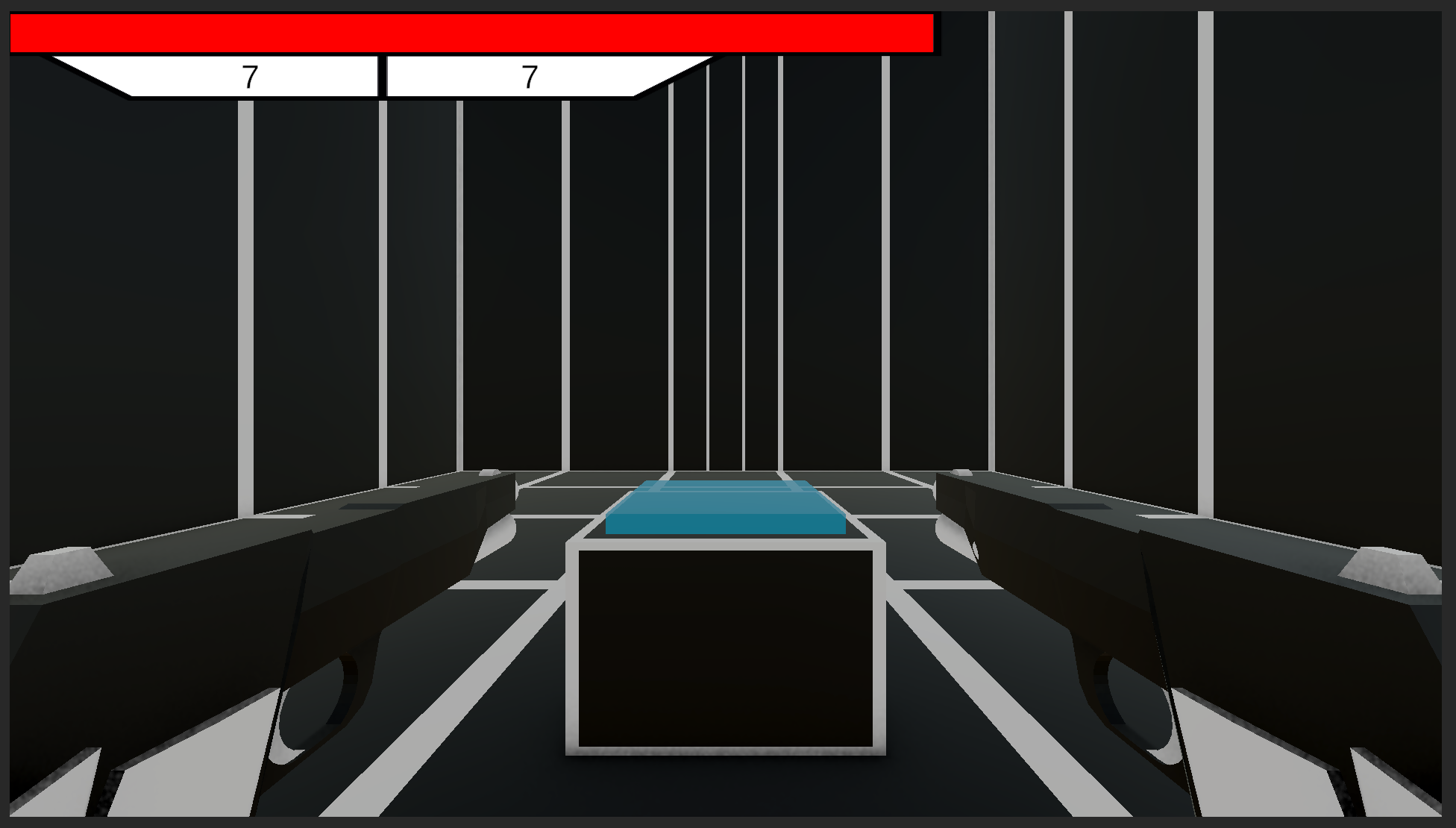
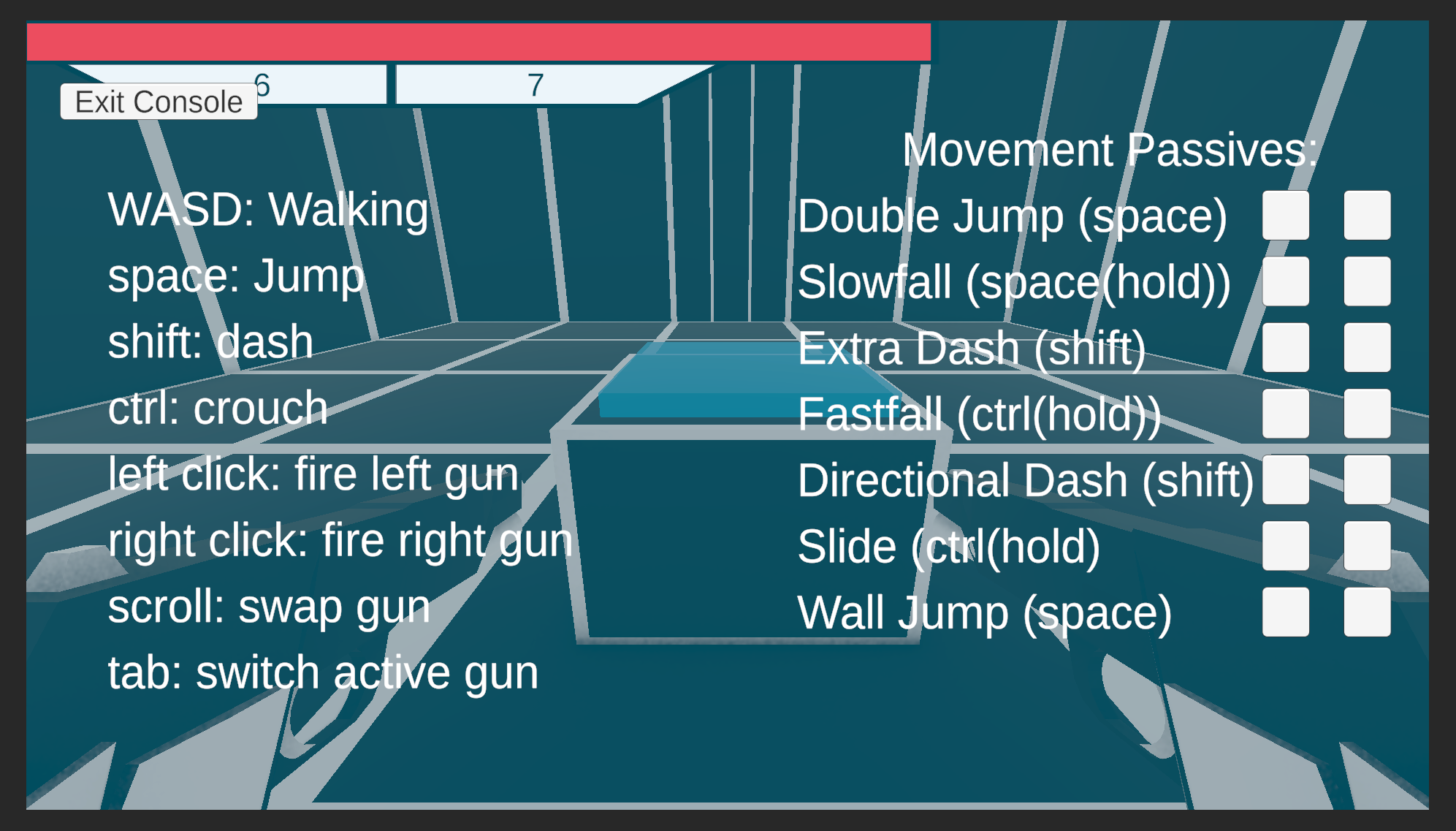
You start up the game and land in this room with a controle pannel infront of you and 2 guns in your hands. The gameloop of this game is to kill enemies over and over again. There are 3 enemy types that try to kill you. Everytime you kill all the enemies you get back to this room to start over again. The spawned enemies are randomized so you are not sure how many of which enemie you are going up against. When going over to the controle pannel you can press E... when pressed a UI opens up, showing you the controles and lets you decide which passive ability you want to use. You can only choose 2 but after killing all the enemies and going back to this room you have the ability to choose 2 other abilities. This makes sure that your gameplay experience will be different everytime you play!
Here we will talk about how the fights look like and how the enemies work.

In this gameyou have to fight 3 kinds of enemies / monsters. You have 2 guns to shoot at them and 2 abilities that you had to choose at the start of the game. As you can see you have allot of space to move around and dodge the enemies. The enemies have a detection range and a closing range. When the play comes inside of the detection range then the enemy will follow the player's position till it gets to its closing range. This is the range between the enemy and the player that the enemy has to keep away from. When the enemy gets inbetween that range it will stop moving so it becomes stationary.


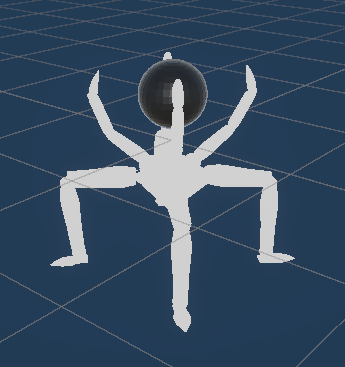
Here we have the 3 types of enemy. The left one is the heavy unit which has allot of health and is slow. It shoots bullets at the player and is very dangerous. In the middle we have the melee enemy. This is a light unit that runs towards the player at a fast pace, with low amount of health and when in range it will spawn a collider infront of him as it's attack. When the player hits that collider... it will damage the player. On the right we have our normal ranged enemy. It has a decent amount of health and has a decent past of speed. It shoots out of the black orb on top of him.

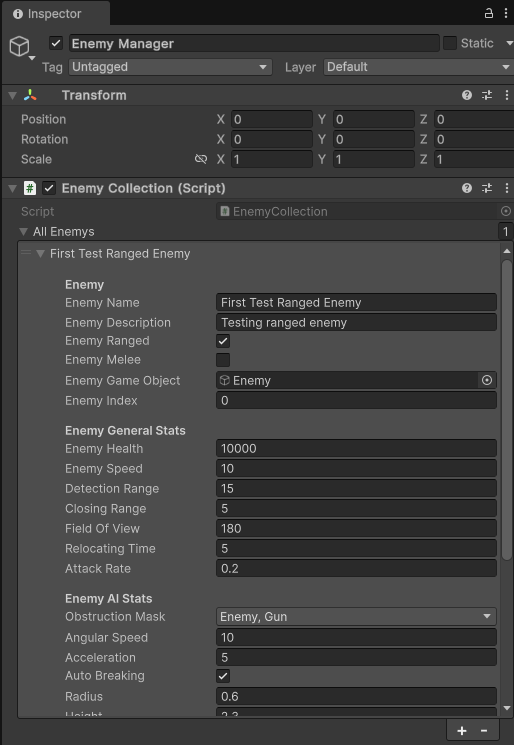
In both the prototype as in the newest version we have made use of inheritence for the guns and enemies. This way we can easily make new guns and enemies and save up on the amount of scripts needed and minimize the complexity of further making variations of assets etc. This also helps saving time. We have tried to minimize the amount of scripts used in this project and tried to optimize it as much as possible and we are still trying to make it better throughout making the first beta version.
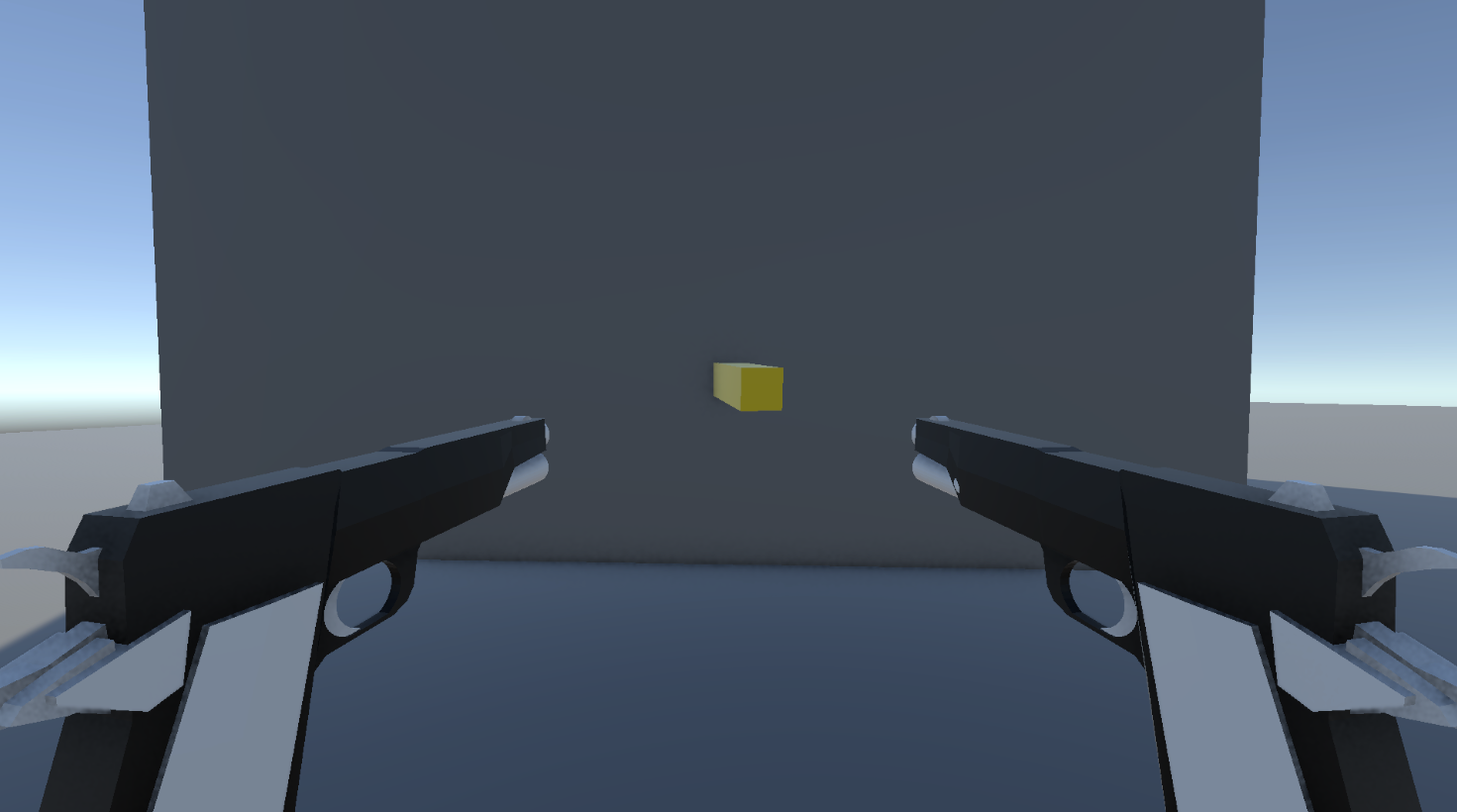

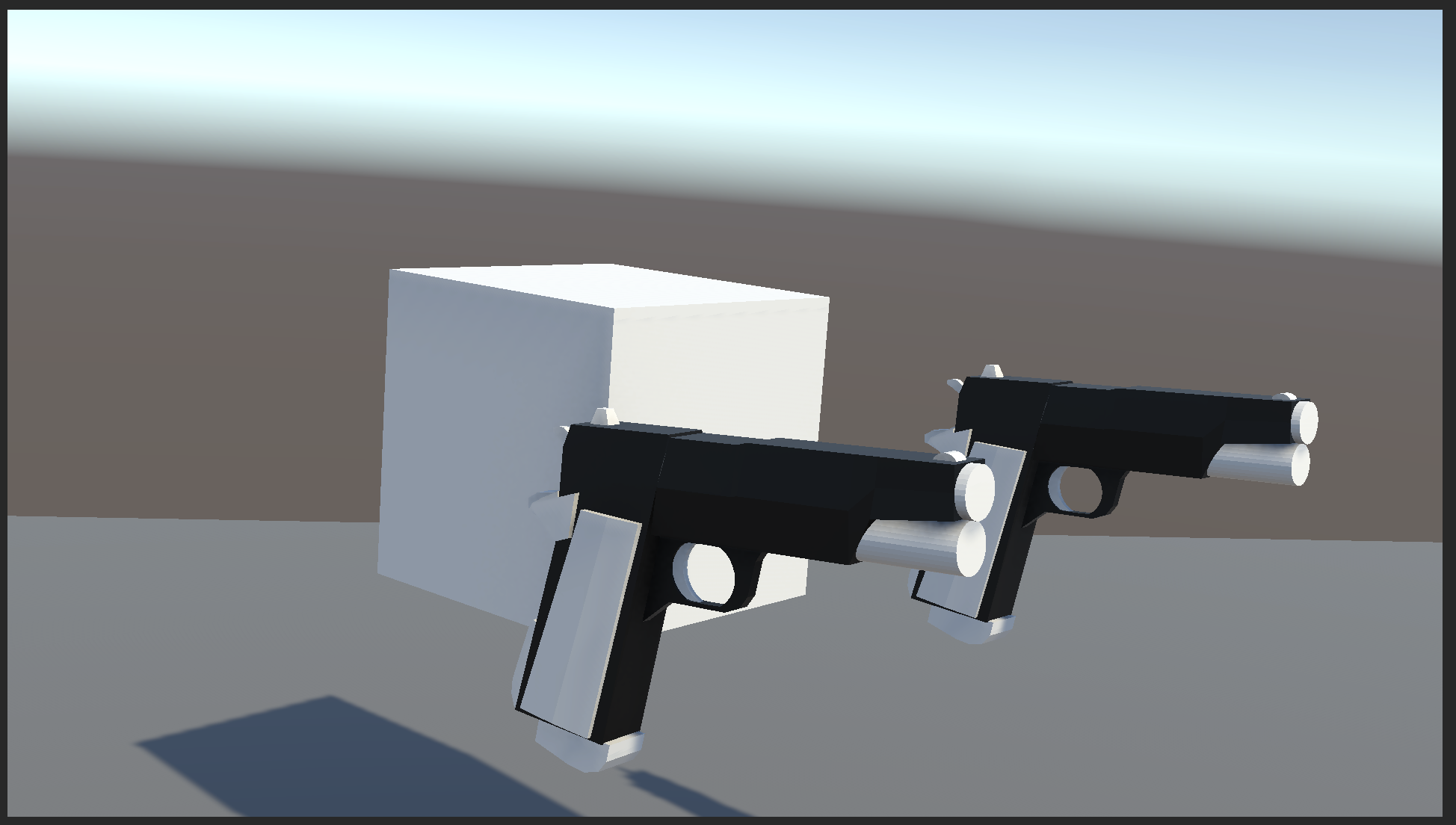
In the new version i have made it so the player uses raycasting to angle the guns to the end point of where the player is looking at. This makes sure that the guns both aim at 1 point making it easier to hit enemies. This also makes the gun animate in a very cool way as you can see in the right picture. This system works as followed... the player is constantly shooting a ray in front of him. When hitting it looks if the tag / layer that is on the collided object is allowed to be used to aim the guns at. When this is correct then the guns will automatically rotate towards that object.
Here is a download link for the build version. It is possible it doesn't work anymore by time but if it does then have fun!
https://mega.nz/file/1GMWlILa#P9PF9b4zH-ozx4kuucTTkNbLF25L44M-qVYsF59PbB4
Don't mind the name of the files please, they are 100% safe
If they ask for a key, just try to restart the page a couple of times
After downloading the file, you have to unpack it
Mind that you can only play this game on your pc




.png)
.png)
.png)


.png)
.png)
.png)
.png)

.png)
.png)
.png)

.png)
.png)
.png)
.png)
.png)
.png)
.png)
.png)
.png)
.png)
.png)
.png)